Finding PropertyGrid Defaults
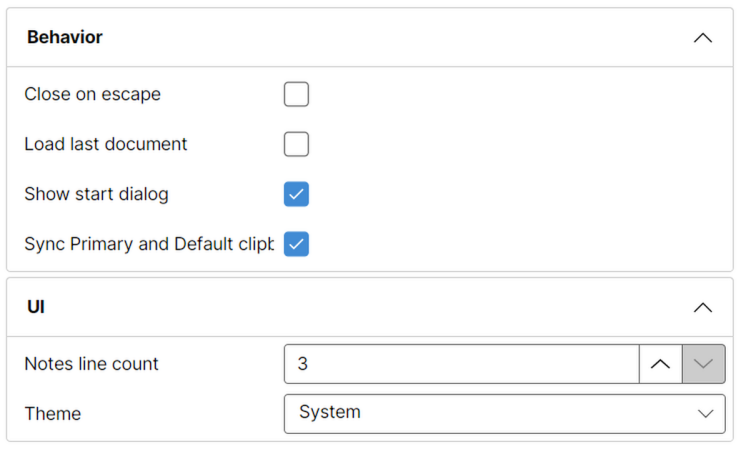
Aficionados of PropertyGrid control already know standard incantations.
[Category("Behavior")]
[DisplayName("Close on escape")]
[Description("Gets/sets if main window should be closed when Escape key is pressed.")]
[DefaultValue(false)]
public bool CloseOnEscape {
    get { return Config.Read("CloseOnEscape", false); }
    set { Config.Write("CloseOnEscape", value); }
}
All those extra attributes get you a nice presentation in the PropertyGrid.
However, as application grows, you might decide upon changing default. If you also expose “Defaults” button, you might have a disconnect between the PropertyGrid and what your button does. Unless, you programatically get the value from DefaultValue attribute. Something like this:
private static T FindDefault<T>(string propertyName) {
    var property = typeof(Settings).GetProperty(propertyName);
    if (property == null) { throw new InvalidOperationException($"Property {propertyName} not found."); }

    var attribute = property.GetCustomAttribute<DefaultValueAttribute>();
    if (attribute == null) { throw new InvalidOperationException($"Property {propertyName} has no default value."); }

    if (attribute.Value is T value) { return value; }
    throw new InvalidOperationException($"Property {propertyName} cannot be converted to {typeof(T).Name}.");
}
Now we adjust property reading to use it.
[Category("Behavior")]
[DisplayName("Close on escape")]
[Description("Gets/sets if main window should be closed when Escape key is pressed.")]
[DefaultValue(false)]
public bool CloseOnEscape {
    get { return Config.Read("CloseOnEscape", FindDefault<bool>(nameof(CloseOnEscape));); }
    set { Config.Write("CloseOnEscape", value); }
}
Then, to setup your defaults, you simply call the function:
private void SetDefaults() {
    Settings.CloseOnEscape = FindDefault<bool>(nameof(Settings.CloseOnEscape));
}
With this, the single source of truth is in your DefaultValue attribute.